Settings, stored files, and privacy
The privacy policy explains local filesystem information, optional marketplace requests, website services, and support information.
For agents and automation, also read agent access and privacy. Read-only scanning does not isolate an agent or hide filesystem metadata from it.
Preferences
Open the gear control or find Settings in the palette. Preferences include units, theme, accent, panels, saved searches, pinned folders, columns, and scan and analysis options. Scan-option changes apply on the next scan; rescan to update results already on screen.
Theme and accent are independent. Theme → System follows the desktop's light/dark appearance; Accent → System uses its accent where supported, falling back to Kosha's blue when no desktop accent is available. You can switch either preference back to System without resetting the other.
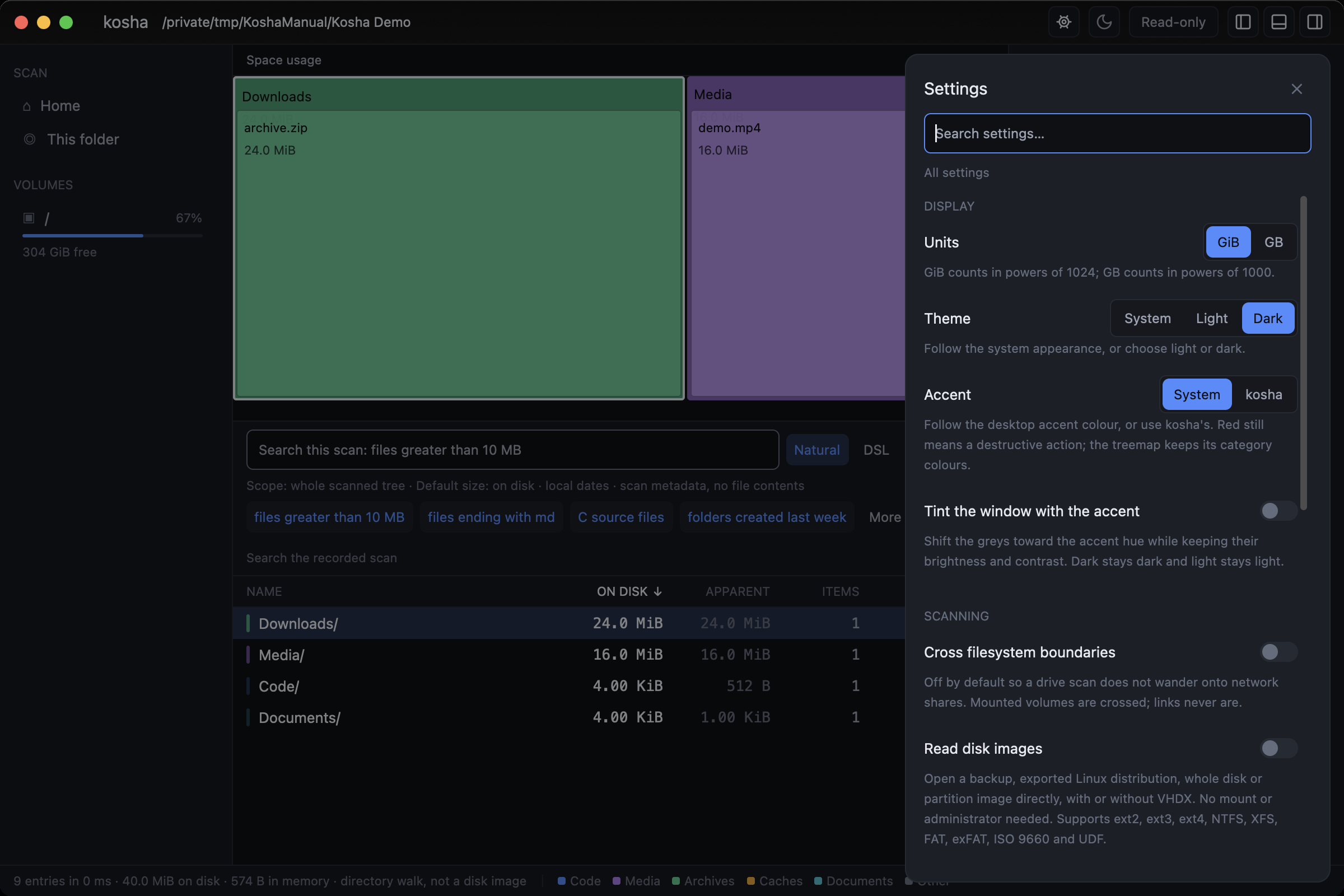
| Group | What to look for |
|---|---|
| Display | Text size, units, light/dark/system appearance, accent and window tint |
| Scanning | Mount boundaries, image reading, ownership collection, and platform-specific allocation, hardlink, or NTFS options |
| Advanced | Analysis thresholds in the JSON settings file and the version to include in bug reports |
Search for Software updates to check the current version, turn daily checks on or off, and find the installation route for your copy.
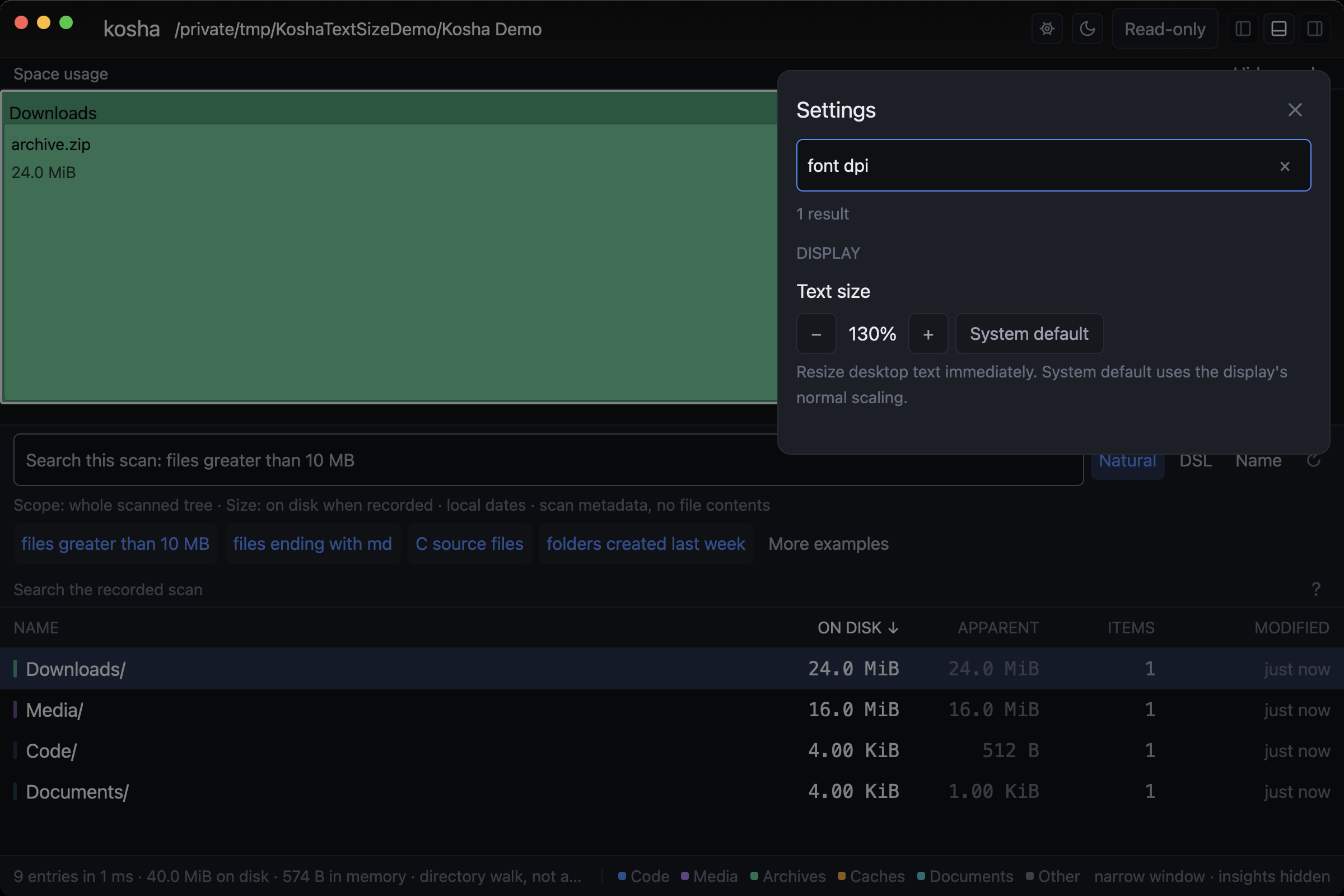
In Settings → Display → Text size, use − and + to resize text live from 80% to 150%. Kosha remembers your preference. System default restores the normal size for your display. You can also use Ctrl+Plus, Ctrl+Minus, Ctrl+0, or hold Ctrl while scrolling over the app. Use Command in place of Ctrl on macOS.
To pin the current folder, open the command palette and choose Pin … to the sidebar. Select the pinned location in the sidebar to scan it. Use the palette's Unpin action or manage pins in Settings.
The fixed Search settings field filters option names, explanations, and
keywords, plus saved searches and pinned paths. Multiple words narrow the
results together: try scan owners, dark, sparse, or thresholds. The count
and clear button stay visible while the options scroll. Filtering never changes
a preference. The panel remembers its search until you clear it or close the app.
Drag the scrollbar to reach options below the fold in a short window.
The settings panel names the settings file. Advanced users can edit its JSON while kosha is closed. Back it up first. Invalid settings are reported instead of silently being overwritten with defaults.
Application directories
The kosha CLI and kosha-gui resolve the same per-user configuration and
data directories when run in the same user and installation/package context.
A snapshot saved by either executable
appears in the other's snapshot list. Both read search-recipes.json; the CLI
can also opt into the GUI's saved drive records with --cache.
| Platform | Configuration | Data |
|---|---|---|
| Windows | %APPDATA%\coolnew\kosha |
%LOCALAPPDATA%\coolnew\kosha |
| Linux | $XDG_CONFIG_HOME/kosha, or ~/.config/kosha |
$XDG_DATA_HOME/kosha, or ~/.local/share/kosha |
| macOS | ~/Library/Application Support/app.coolnew.kosha |
Same directory |
Linux uses the fallback when its XDG variable is unset, empty, or relative, following the XDG Base Directory Specification. Automatic drive records live in the data directory because they retain the last completed observation across sessions. Windows scan data stays in the local profile rather than roaming with settings. macOS interactive coverage is less extensive than Windows and Linux.
Windows Store package storage
The portable ZIP and offline Setup use the ordinary Windows paths above. The Store MSIX uses the same logical AppData paths, with Windows redirecting new files to package storage. On a fresh Windows Sandbox profile, a test-signed copy of the v0.18.0 Store-upload MSIX wrote these physical paths:
%LOCALAPPDATA%\Packages\41817QuickEffectiveApps.KoshaApp_janh1e0nresyp\LocalCache\
  Roaming\coolnew\kosha\settings.json
  Local\coolnew\kosha\snapshots\
Open the LocalCache path in File Explorer. Use the Roaming\coolnew\kosha
branch for configuration and Local\coolnew\kosha for data. The packaged
GUI wrote the settings file and the packaged CLI saved and listed its
snapshot. The portable CLI saved to ordinary
%LOCALAPPDATA%\coolnew\kosha\snapshots\ and listed its own snapshot.
Uninstalling the MSIX removed its redirected settings and snapshot and
preserved the portable snapshot.
Windows may use an existing ordinary AppData file when the package has no private copy. Check both locations when looking for an older record. Before resetting, uninstalling, or switching editions, copy needed snapshots and exports to a folder you choose outside package storage. See Microsoft’s AppData virtualization rules.
| File or folder | Directory | Purpose |
|---|---|---|
settings.json |
Configuration | GUI preferences, saved queries, pins, columns, window placement |
search-recipes.json |
Configuration | Optional shared phrase-to-DSL search recipes |
recipe-packs/ |
Configuration | Managed copies of explicitly installed recipe packs, shared by the CLI and GUI |
marketplace-catalog.snapshot |
Data | Last synced public marketplace catalog and its GitHub commit, shared by the CLI and GUI |
rules.d/ |
Configuration | Optional JSON rule packs for findings |
insight-packs/ |
Configuration | Managed review-only insight packs in builds after 0.10.7; separate from personal rules |
snapshots/ |
Data | Explicit .kosha records saved by either executable |
drive-cache/ |
Data | Automatic historical records written by the GUI and read explicitly by the CLI |
volume-history/ |
Data | Drive-history observations and opt-in tracking preferences, grouped by volume, with bounded local retention |
audit.jsonl |
Data | Append-only history of approved file-changing actions |
cleanup-workflows/workflows.json |
Data | Saved workflow names, pinned local locations, and relative file paths |
Publisher-qualified packs use recipe-packs/PUBLISHER/pack-ID.json. Older flat
recipe-packs/pack-ID.json copies remain valid. Personal recipe files are not
merged with downloaded packs. The saved catalog is a validated snapshot of
the complete root/index set; a failed sync preserves its previous contents.
See marketplace formats for identity and capability rules.
Exports go to the location you select, or the CLI's --out path. Automatic
drive-snapshot filenames are internal identifiers; the app displays their root
and age instead.
Back up, reset, or remove records
Close kosha before managing its files. Back up settings.json,
search-recipes.json, rules.d/, and snapshots/ to retain preferences,
recipes, rule packs, and explicit history. Copy exports you want to preserve.
Snapshots can be large on large trees.
For a Store installation, check the package storage paths as well as the ordinary AppData folders before backing up or removing records.
Removing drive-cache/ discards remembered drive scans; the next drive click
scans again. Removing an explicit snapshot discards that observation. Renaming
settings.json out of the configuration directory lets the app use defaults
while preserving the original for recovery. Removing the audit log discards
history and does not undo operations.
Privacy and rules
Scanning, analysis, and record storage run locally. kosha has no telemetry or cloud-sync feature. Your OS backup or sync software may still copy these files.
Snapshots and exports contain names, paths, sizes, timestamps, and any collected ownership data. Audit entries can contain affected paths. These records do not contain copies of scanned file contents, but their metadata can be sensitive. Review them before sharing.
Optional rule packs in rules.d/ extend findings and are validated before use.
Their suggestions still follow normal confidence, mode, and confirmation rules.
Rescan after editing a pack to refresh findings.
Author local insight rules
These JSON files produce findings; search recipes instead translate queries. Managed insight packs use a distinct, review-only capability. Local insight files use this separate version-1 contract:
{
  "version": 1,
  "rules": [{
    "id": "review-session-records",
    "title": "Session records to review",
    "detail": "These may contain valuable conversation history. Review before changing anything.",
    "subject": "directory",
    "location": {"base": "home", "path": ".codex/sessions"},
    "action": "review-only"
  }]
}
Save as a regular .json file directly in rules.d/. Use your actual tool's
storage location; this example does not discover custom profiles or classify
session histories as junk. Kosha evaluates recorded directory metadata, never
conversation contents. No commands, scripts, network access, regex, fuzzy
selectors or AI models are part of this format.
Each rule needs id, title, detail, subject, action, and exactly one
matcher: location is a structured exact path; directory is an exact directory
name anywhere in the scan. A directory matcher can require any of up to eight
sibling marker names in beside. See location bases and limits
for home, scan_root, absolute, cache, temp and local_app_data.
Matching is literal against recorded metadata. Unknown providers and targets
outside the recorded scan produce no match. Nodes below the minimum finding
size are omitted. The old under-home key is rejected; no compatibility aliases
are retained.
Location rules always require review-only, with likely confidence. Directory
rules support review-only, trash, or empty-contents; a bare name supports
only review, while a required sibling marker earns stronger evidence.
Confidence is derived, never author-supplied.
Path/name evidence does not prove data is disposable. Prefer review for history,
credentials, profiles, user-created data and tool-managed caches. In particular,
use uv's own cache commands rather than deleting its cache directly; see
uv cache safety.
Kosha never runs the commands in explanatory text.
Builds after 0.10.7 enforce these limits: 256 KiB per file, 32 rules per file, 32 JSON files and 64 accepted rules across the directory. Fields are bounded in UTF-8 bytes: ID 80, title 160, detail 4,096, subject 80, directory name 255, relative home path 1,024, and each sibling marker 255. IDs use lowercase ASCII letters, digits and hyphens and cannot duplicate built-ins or earlier files. Files load in filename order. Over-budget or malformed files and unknown JSON fields are refused; a bad individual rule leaves valid rules in that file usable. A file that exceeds the remaining aggregate rule budget is skipped as a whole; more than 32 JSON files refuses the directory. Errors are reported and inputs are never rewritten. Links and directories are not rule files.
These budgets bound loading and rule count; they are not a scan-time guarantee. Directory-name rules can still examine a large tree; exact home-path rules use the existing sorted child-name index. Managed insights have stricter path and aggregate limits and do not accept directory-name or destructive rules. A finding never grants filesystem access or bypasses the normal mode, preview, source, identity and confirmation safeguards.