DISK EXPLORER · DESKTOP + CLI
Less disk mystery.
More room for
what matters.
See what’s filling your drive. Find the files you meant to find. Know what changed. Kosha brings a visual disk explorer, plain-language search, and a scriptable CLI into one fast, local toolkit.
Download Kosha ↗ Take a look ↓
Windows · Linux · Experimental macOS
macOS: drag the DMG’s app to Applications. Not Apple-notarized; a trusted download may need Privacy & Security → Open Anyway after trying to open it. macOS setup and warning details.
Open source · Read-only scanning · No model required
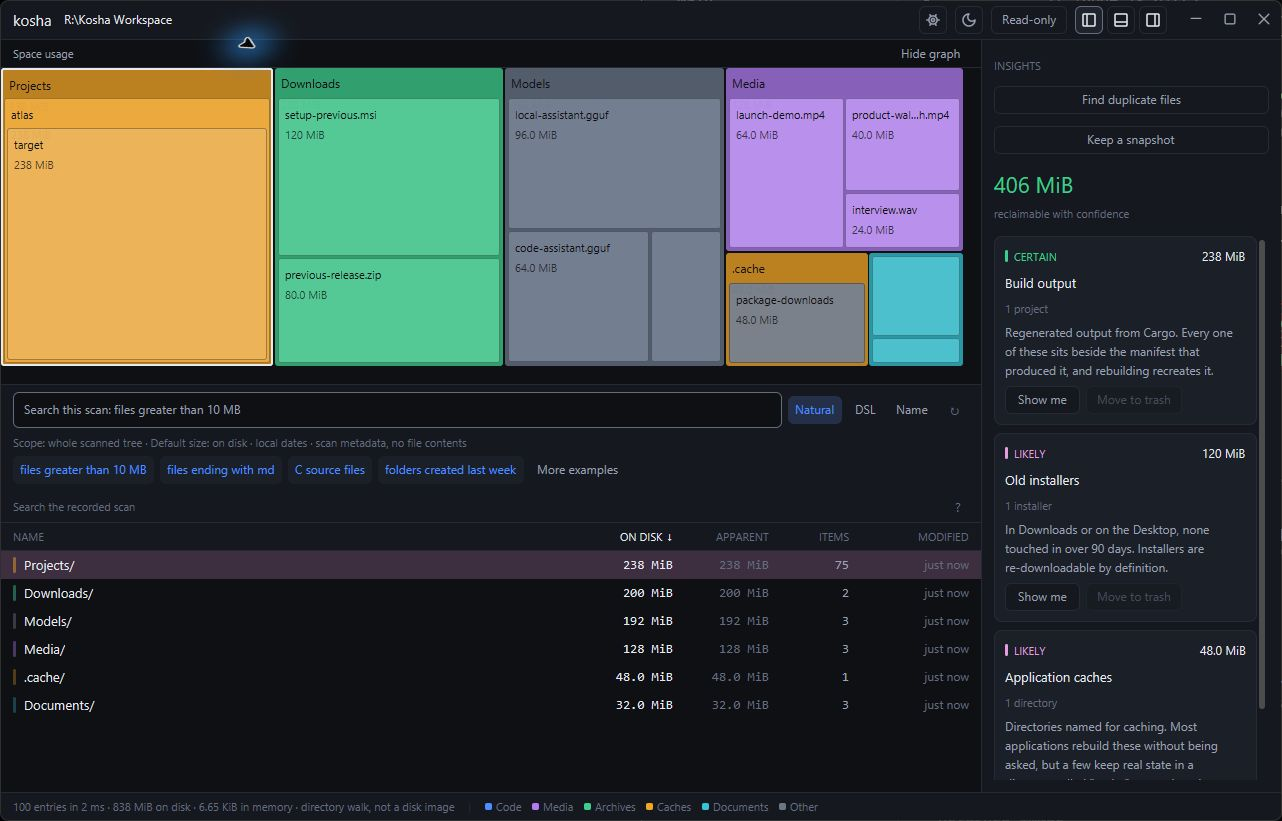
A map for your files. A memory for your disk. A CLI for your workflow.
FROM “WHERE DID IT GO?” TO “THERE IT IS.”
A clearer picture, in one scan.
Big files are only part of the story. See the space they occupy, understand the findings, and narrow the view to what matters to you.
01 / EXPLORE
Follow the space.
Go from a whole drive to a single folder in the treemap. Review ranked findings beside your files, with explanations to guide the next step.
02 / FIND
Search like you think.
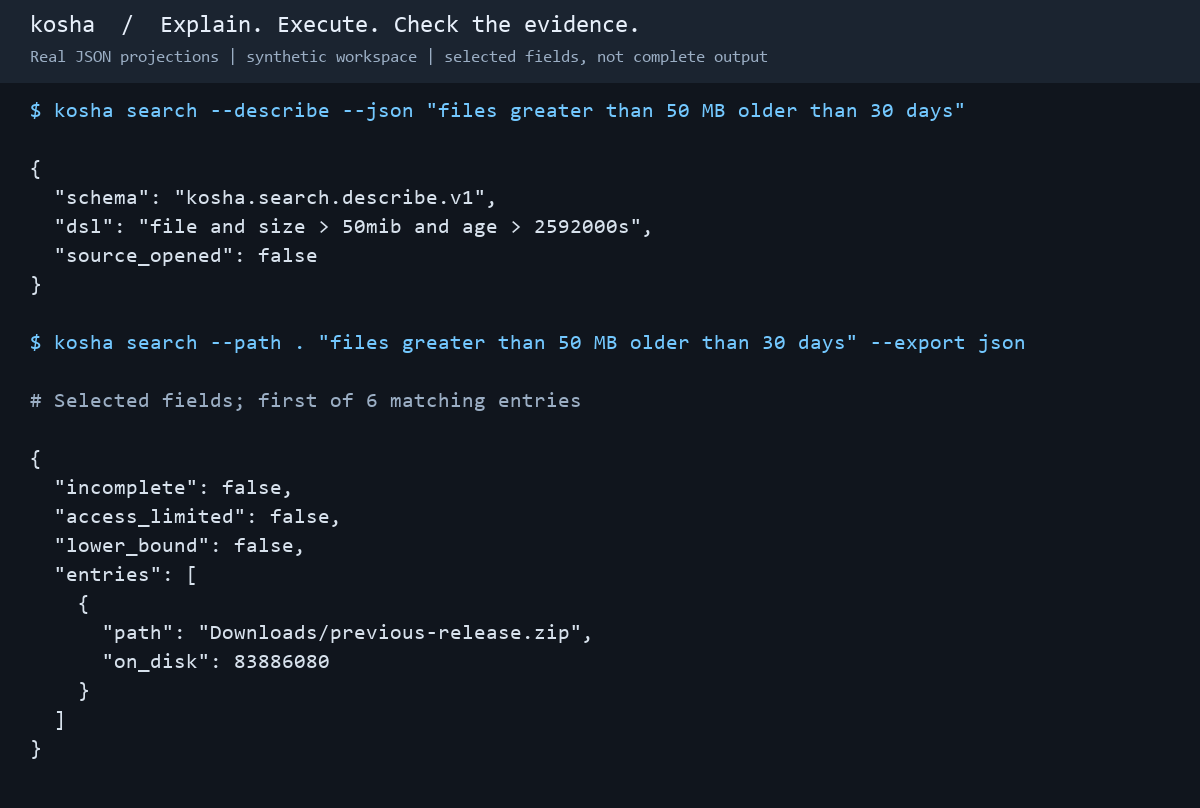
“Images larger than 10 MB.” “Files created last week.” See the interpretation, edit the query, and export the matching paths as TXT, CSV, or JSONL.
03 / COMPARE
Remember what changed.
Keep snapshots and compare them to see where space grew. Return to a saved drive scan with its age visible, then rescan when you want a fresh view.
YOUR FILES. YOUR CALL.
Start with understanding.
Scanning does not intentionally rewrite scanned file contents. In the desktop app, cleanup needs an explicit mode change and review. CLI exports, snapshots and marketplace management can still create, replace or remove files.
- 1Scan a drive or folder
Build a picture of what’s there.
- 2Explore, search, compare
Find the files behind the numbers.
- 3Decide what to keep
Review findings before taking action.
BUILT FOR REAL DRIVES
Millions of entries.
Seconds to perspective.
11.4seconds
2.86 million entries · NVMe SSD
Crucial P3 1 TB · Windows NTFS MFT · Administrator
20.1seconds
4.09 million entries · HDD
Ultrastar DC HC550 16 TB · Windows NTFS MFT · Administrator
Reference observations from Kosha 0.10.3, not a controlled benchmark. Cache state and repetitions were not recorded. These are filesystem metadata scan times; results vary. NTFS MFT scanning requires administrator access.
FOR HUMANS. FOR SCRIPTS. FOR AGENTS.
Your terminal.
Your workflow.
Scan, search, compare snapshots, and export structured results. Use the same toolkit interactively or give your coding agent a concise CLI guide.
Explore the CLI → Read the agent guide
Using an agent? Understand its access and privacy boundaries →
AGENT ACCESS & PRIVACY
Choose what your agent can see.
Kosha runs with the access granted to its process. Read-only scanning still reveals metadata; Kosha does not sandbox an agent running under your account. Contain the agent and its tools, and share only the workspace or recorded metadata you intend it to inspect.
Share only the metadata you choose. Starting with 0.12.0, publish a selected subtree as a metadata view, then give a fixed-view session that approved artifact. Excluded entries are absent from the artifact itself. See the workflow and limits →
The agent's environment must restrict its other access. Kosha supplies selective disclosure and cooperative tools, not an agent sandbox. A whole snapshot still exposes every recorded entry to its recipient.
MAKE IT SPEAK YOUR LANGUAGE
A search toolkit that grows with you.
Install optional marketplace packs or author your own phrases, typed templates, and extraction rules. Translation runs locally without an ML model. Inspect the query before relying on the results.
BUILT WITH YOUR FEEDBACK
Help shape Kosha.
Report something that does not work, or suggest an improvement. A short guided form helps you share the details needed to investigate.
GitHub sign-in is required to submit. Reports are public: remove personal paths, file names and sensitive logs before sharing. Please report security concerns through our private security contact.
MAKE SPACE FOR WHAT’S NEXT
Get to know your disk.
A visual explorer when you want to look around. A CLI when you want to get things done.
Download Kosha ↗ Installation guide
Windows · Linux · Experimental macOS · MIT OR Apache-2.0
Safety and privacy · Agent access and privacy · Tests and quality · Measured coverage · Source on GitHub
Under active development. The manual follows current source; check your installed version. Built with assistance from large language models, with maintainer review and testing.