Command-line guide
Using the CLI through an agent? Read agent access and privacy. Kosha uses the process's OS permissions; a scan path or query filter is not a per-agent access restriction.
The CLI is not filesystem-write-free: --out FILE can replace an existing
destination, snapshots write records, and marketplace management writes local
state or removes installed packs. These operations do not use the desktop's
Read-write confirmation. See write-capable operations.
For owning-tool advice on recorded workflow locations, use
kosha "PATH" --cleanup-guide. It does not execute cleanup; see
the cleanup guide for supported locations and limitations.
For publisher-qualified package IDs, generic catalog compatibility, typed templates and regex extraction, see marketplace formats.
The terminal scanner is kosha (kosha.exe on Windows). The desktop executable
is kosha-gui. Quote paths and queries containing spaces or shell operators.
Ordinary path invocations scan freshly at full depth. They do not read or update
the GUI cache. A depth limit requires an explicit --depth flag.
Software updates
Run kosha update check to view the installed version, the latest stable
release, and the update guide. Run kosha update open to open the relevant
release or installer guidance. See updating an existing installation.
Scan and query
For deliberately shared metadata and a fixed-source automation session, see
kosha view, available in development source after 0.11.0.
It uses a distinct artifact and does not alter ordinary scan/export behavior.
kosha --version
kosha --help
kosha "/path/to/folder" --stats
kosha "/path/to/folder" --top 25 --insights
kosha "/path/to/folder" --query "file and size > 1gb"
kosha "/path/to/folder" --owners
kosha "/path/to/folder" --duplicates
Replace /path/to/folder with a real path, such as C:\Users\YourName\Downloads
on Windows. Ctrl+C requests cancellation. A stopped directory walk can report
incomplete results; some strategies return a cancellation result instead.
| Option | Purpose |
|---|---|
--exact |
Request exact on-disk allocation |
--hardlinks |
Request counting hardlinked bytes once, including where identity costs extra work |
--no-hardlinks |
Count each name separately |
--cross-fs |
Descend across mount boundaries |
--depth N |
Limit traversal depth; unvisited directories make the result incomplete |
--decimal |
Display decimal units |
--query-help |
Print the query-language fields, operators, and examples without scanning |
--mft |
Request NTFS table reading on Windows. An installed MSIX that includes the Fast NTFS worker can ask for administrator consent when scanning a whole NTFS drive. |
--image |
Request a supported disk-image strategy |
--wsl-native |
On Windows, use the installed Linux CLI to scan a whole WSL2 distribution |
The report identifies the strategy used or why a requested strategy was unavailable.
For example, kosha D:\ --mft --stats requests Fast NTFS for the entire
drive. On a package with the worker, Windows can ask for administrator
consent for that scan. If consent is declined, Kosha walks the drive with
its ordinary permissions. A folder scan or options that change scan
coverage, such as --depth or --no-hardlinks, use the existing scanner.
Read the scan report
The summary gives the scan root, allocated and logical totals, the number of entries including the root, and the duration recorded by the scan. The largest entries list covers immediate children of the root. Each row shows allocated size, its percent and bar relative to the root's allocated total, and its name. A trailing slash marks a directory. The count after … and is the number of additional immediate children omitted from the display.
--stats field |
Meaning |
|---|---|
directories, files |
Recorded directories (including the root) and non-directory entries. |
max depth |
Deepest recorded level, with the root at zero. The stored depth saturates at 255. |
unreadable |
Entries the scanner could not read. Use --query unreadable to list the recorded entries. |
other devices |
Mount or device boundaries the scan recorded without descending into them. |
hardlinks deduped |
Additional names whose bytes were counted under another name for the same file. |
elapsed, entries/sec |
Scan duration and total entries divided by that duration. Timing can vary with cache state and filesystem. |
tree memory |
Memory attributed to the retained tree, followed by the average per recorded entry. Peak process memory includes transient work and can be higher. |
A leading ~ and the accompanying messages flag limited coverage. A stopped
scan or a depth limit can leave work unvisited. A completed scan can still have
access errors. A report loaded from a snapshot or cache describes the original
observation.
Ownership, findings, and duplicates
- OWNERS shows allocated size, percentage and bar relative to the scan, account name or ID, and separate counts of owned files and directories. System accounts have their own section. An unresolved UID or SID can still be counted. Historical records need ownership metadata from the original scan.
- INSIGHTS shows estimated reclaimable bytes when applicable, the finding title, confidence, proposed action, and number of relevant entries. Read the explanation and sample paths. Entries counted in an earlier finding are identified to avoid double-counting reclaimed space.
- DUPLICATES gives the number of candidates examined, bytes read for
hashing, and separate counts for unavailable, unreadable, and too-small
files. Each confirmed group shows the number and size of identical files,
estimated recoverable allocation after keeping one, and their paths.
--dupe-min Nsets the minimum length in bytes and requests the hunt. The minimum defaults to 1 MiB.--dupe-budget Nsets an estimated read budget in bytes and requests the hunt. It defaults to 8 GiB. Kosha schedules whole same-size groups from largest to smallest and counts the estimated cost of both hashing passes. The final group may exceed the budget. The report shows how many files and what sizes were left out. A zero budget reports omissions without opening candidate files. Snapshots, caches, and disk-image views do not supply file contents for this report. Cloud placeholders are skipped rather than downloaded and reported asN files stored in the cloud, skipped rather than downloaded; see cloud-synced folders.
Natural-language search
kosha search --describe "folders created last week"
kosha search --describe "files apparent size over ten megabytes"
kosha search --load "saved-scan.kosha" "files ending with md" --top 25
kosha search --path "C:\Users\YourName\Downloads" "files created today"
kosha search --load "saved-scan.kosha" "documents except pdf" --export json --out "matches.json"
kosha search --help
kosha search --list-recipes
--list-recipes lists built-in recipes for the running platform. Add --recipes FILE to inspect a local recipe pack, with optional --filter TEXT to narrow by phrase, DSL, or pack metadata. See search recipes. --describe prints the exact DSL, extracted entities with input byte spans, the captured local clock, and date boundaries. It opens no snapshot and scans no path; use it to understand a phrase before running it. Unsupported wording produces diagnostics and a nonzero exit status.
Execution requires exactly one explicit source: --load searches a saved
snapshot without rescanning its original location; --path performs a fresh
directory scan and searches that tree. The complete phrase must be one quoted
argument. Natural-language search uses the same deterministic translator as the
desktop app. The command is kosha, not kosh.
--top limits displayed rows, while counts and totals cover all matches. Exports include every match regardless of --top; stdout carries only the export when no --out is given. Use --stats for scan, index, and search measurements. Queries over missing creation dates report unavailable or partial metadata; modification times never substitute for creation times. The search clock is captured once and stays fixed through scanning and evaluation.
The human report includes the phrase, interpreted DSL, source and scan method, number matched, total allocated bytes, and number of entries searched. Paths are shown with their allocated sizes. Matching a directory and its descendants does not add their overlapping storage twice to the result total. SEARCH STATS separates time building the index from time evaluating the query. Index memory measures the search index separately from the tree.
Snapshots and comparisons
Explicitly use the GUI cache
kosha --caches
kosha --caches --export json
kosha --caches --cache-dir ./my-drive-cache --export jsonl
kosha C:\ --cache --export json
kosha search --path C:\ --cache "files over 1 GB" --export txt
kosha C:\ --cache --cache-dir ./my-drive-cache --export json
On Linux, use the same mount path you scanned in the desktop app. For example,
use kosha /mnt/archive --cache --export json after the GUI has saved a
completed scan of /mnt/archive.
Completed whole-distribution WSL scans on Windows also update the automatic
cache. Use kosha "\\wsl.localhost\Ubuntu" --cache to browse the saved scan
without starting Ubuntu.
--caches inventories automatic drive and WSL records without scanning the original
drives, creating a cache directory, or decompressing their trees. It shows the
recorded root, original UTC timestamp, age, entry count, partial/incomplete
indicators, record size and cache-file path. Damaged headers are listed as
unreadable rather than disappearing. Explicit snapshots remain in --snapshots.
The JSON document uses schema kosha.cache.list.v1 with directory,
header_only: true and a records array. JSONL writes one
kosha.cache.entry.v1 object per record; an empty cache produces zero JSONL
lines. Inspect status: recorded, incomplete, root-mismatch, or
unreadable. Unreadable records carry an error and may lack root/date fields.
Successful enumeration can include unreadable records. A readable header does
not validate the compressed body; opening with --cache performs the full check.
Missing cache directories list as empty; other directory-access errors fail.
--cache reads the same last completed drive record as the GUI. Its age and
source path are reported on stderr. It does not scan, refresh, or write the
cache. A missing, corrupt, or mismatched record is an error; omit --cache to
request a fresh scan. --cache-dir requires --cache or the standalone
--caches listing and selects a custom
directory using the same record naming/layout. Folder roots only work if an
automatic record exists for that exact root; normal GUI automatic records are
for drive roots. Scan-only options and duplicate-content checks cannot be
combined with cached input. A partial record can contain access errors; a
cancelled or depth-limited record is not accepted as a completed cache.
Explicit snapshots
kosha "/path/to/folder" --snapshot --label "Before cleanup"
kosha --snapshots
kosha "saved-scan.kosha" --stats
kosha "/path/to/folder" --since "saved-scan.kosha"
kosha "newer.kosha" --since "older.kosha" --since-min 0
Snapshot inputs accept a full path, a relative path, or an exact filename from
the shared explicit-snapshot store (including .kosha). This works for ordinary
snapshot browsing, comparison --since, and search --load.
Local paths take precedence. If saved-scan.kosha exists in the current
directory, it is opened there, even when the store has a snapshot with the same
name. If that local file is corrupt, the command fails rather than silently
opening another record. Only a missing bare filename falls back to the store.
Use ./saved-scan.kosha (or .\saved-scan.kosha on Windows) to require a local
path without fallback; use the full store path printed by --snapshots to
select the stored copy explicitly. Labels and partial filenames are not lookup
keys. The selected file and original observation timestamp are printed on stderr.
CLI snapshots are explicit. Automatic desktop drive history is separate and
does not appear in --snapshots. Snapshots cannot restore file contents. Use
consistent scope and settings for comparisons. --since-min N sets the minimum
absolute allocated-byte change shown, with a default of 1 MiB on the CLI.
A full CSV scan export can also serve as a baseline. Use an unfiltered export
with the same root and path convention so omitted paths do not appear new.
The report identifies
the observations, distinguishes directory and file changes, and shows new,
grown, shrunk, or gone paths. The net is across file changes, including
changes below the display threshold. Directory totals can overlap their children.
Import an ncdu listing
From Kosha 0.13.0, kosha import keeps a listing written by
ncdu as a record in the snapshot folder:
ncdu -o srv.json /srv
kosha import --from ncdu srv.json --label "build-box /srv"
ssh build-box ncdu -co- /srv | kosha import --from ncdu - --label "build-box /srv"
kosha --snapshots
kosha "SAVED.kosha" --stats
The input is an ncdu JSON export (ncdu -o), uncompressed, gzip-compressed or
zstd-compressed (ncdu -c). Use - to read standard input. The command prints
counts, the provenance line and an imported to path. You run ncdu yourself,
on this machine or another; Kosha starts no program, makes no network request,
and never opens a path named inside the listing.
| Option | Meaning |
|---|---|
--from ncdu |
Read an ncdu JSON export. |
--label TEXT |
Name the record. |
--max-input-bytes N |
Refuse input, or decompressed input, larger than N bytes. The default is 8 GiB. |
An imported record opens like a snapshot, with --stats, --query,
--insights, search --load and --since. Every view states
Imported from ncdu 2.9 (export 2026-11-20 14:02 UTC). Not measured by Kosha.
(with the tool and date from the file), and stderr reports
source: imported; measured_by_kosha=false. JSON exports add
"imported": true and "measured_by_kosha": false. Insights are advice about
the source machine and never offer an action; rules about this machine's
allocation do not run. --duplicates, --snapshot and scan options are refused.
See importing listings for limits and what is
recorded.
Saved cleanup workflows
Use a named workflow to review the same explicitly selected files again after a new scan. File paths are relative to the original local folder.
kosha cleanup-workflow create "Build logs" ./project build/debug.log build/test.log
kosha cleanup-workflow list
kosha cleanup-workflow show "Build logs"
kosha cleanup-workflow edit "Build logs" build/debug.log
kosha cleanup-workflow preview "Build logs"
kosha cleanup-workflow run "Build logs"
Edit replaces the whole file list and retains the original location. Preview scans the location and reports the current targets. Run requires an interactive terminal and explicit approval before it moves anything to Trash. A blocked or missing file stops the preview, so you can decide whether to edit the workflow. Keep the audit log available to run a workflow. See cleanup safeguards.
Scheduled storage monitoring
Add a local drive or folder with at least one threshold in bytes.
kosha monitor add /path/to/folder daily --growth-bytes 1073741824
kosha monitor list
kosha monitor check 1
kosha monitor show 1
Use the profile ID from list. Add --low-space-bytes N to alert when
the containing filesystem has fewer than N bytes available. update
replaces the cadence and enabled thresholds for an existing profile.
Use pause ID and resume ID to control scanning.
Use remove ID to stop monitoring that location permanently. Its saved
observations remain available through show ID.
Schedule kosha monitor check --jsonl in your operating system's scheduler
for one pass over due profiles. The command exits after that pass.
The desktop app also checks due profiles while it is open. Both entry
points share a lock and the last attempt time.
Exit status 1 means a scan was skipped, cancelled, or failed during the
pass. Exit status 2 indicates a command or setup error. show ID lists
retained snapshot paths and the observation IDs behind alerts. Pass the
two snapshot paths to kosha compare to inspect a growth alert.
Exports
kosha "/path/to/folder" --export csv --out "scan.csv"
kosha "/path/to/folder" --export json --out "scan.json"
kosha search --path . "documents" --export txt --out "paths.txt"
kosha search --path . "documents" --export csv --absolute-paths --out "matches.csv"
kosha search --path . "documents" --export jsonl --absolute-paths --out "matches.jsonl"
Without --out, exports go to standard output. Exports may expose names and
paths; review them before sharing. --help lists all options and numeric units.
TXT is a headerless UTF-8 list of full filesystem paths, one per line. Names
containing line breaks cannot be represented unambiguously and refuse TXT;
choose CSV or JSONL for those names. CSV quotes fields according to RFC 4180.
JSONL contains one entry object per line, with no surrounding array or header.
--export json produces a document with scan metadata and an entries array.
CSV/JSON/JSONL paths default to relative to the scan root; --absolute-paths
requests full paths. JSONL and TXT alone do not carry the scan metadata: keep
stderr or use JSON when completeness and source age matter.
The root is contextual metadata and is excluded from entry export rows.
--export-min N filters the regular scan export by allocated bytes.
Import an rclone listing
rclone lsjson -R gdrive: > drive.json
kosha import --from rclone drive.json --root gdrive: --label "Drive listing"
Use --from auto to detect ncdu, rclone or QDirStat, - for standard input, or
--out FILE to write a new snapshot at a chosen path. Existing output files
are preserved. For rclone, --tool TEXT records the source tool version and
--observed-at TIME takes an RFC 3339 observation time. Without that option,
the observation time is unknown. Sizes are apparent and can be lower bounds
when the listing contains unknown sizes.
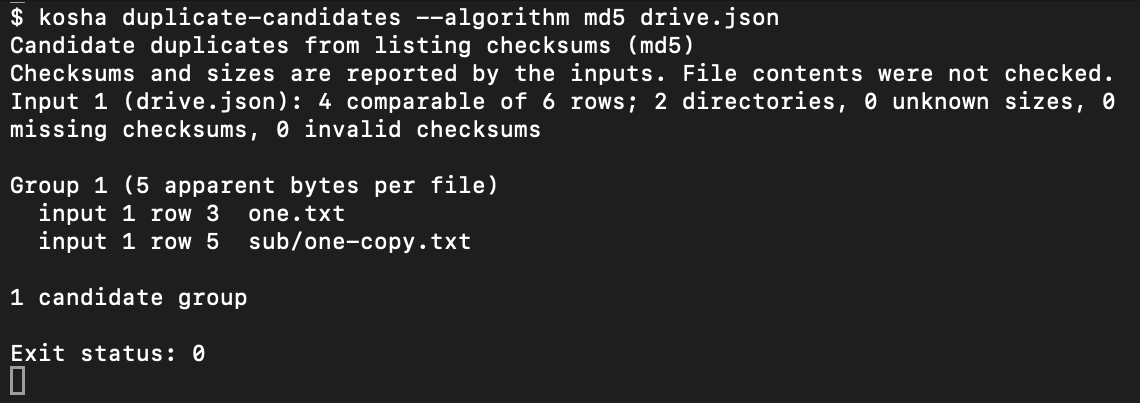
Find duplicate candidates in rclone listings
rclone lsjson -R --hash-type md5 gdrive: > drive.json
kosha duplicate-candidates --algorithm md5 drive.json
kosha duplicate-candidates --algorithm md5 drive.json archive.json
Use the same checksum algorithm for both listings. Kosha supports md5,
sha1, sha256, quickxor, and dropbox. Only rows with a known apparent
size and a valid checksum for the selected algorithm can match. With two
inputs, each group has members on both sides. The coverage counts show how
many rows qualified, including when one side has no usable checksums.
Kosha reads the listing files locally. The matches are candidates based on
recorded metadata. They carry no file actions or reclaimable-space estimate.
Generating checksums with rclone may require remote requests or file reads,
depending on the backend. Use - for one input from standard input.
Each listing is limited to 256 MiB both on disk and decoded. The shared limits are one million eligible rows and 64 MiB of retained path text. The report counts all groups and displays up to 100, with up to 10 members per input in each group.
Import a QDirStat cache
qdirstat-cache-writer /srv srv.cache.gz
kosha import --from qdirstat srv.cache.gz --label "Server listing"
Kosha reads QDirStat cache formats 1.0 and 2.0, plain or gzip-compressed. Totals use apparent sizes. The cache has no inode IDs, so each hard-link name contributes its recorded size. Caches written by the QDirStat app before 1.7 may contain per-link shares instead of full file sizes.
Compare folders and saved snapshots
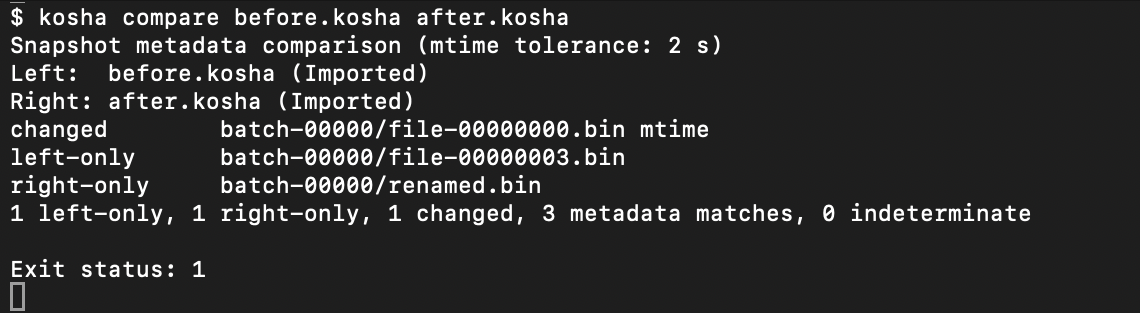
kosha compare before.kosha after.kosha
kosha compare ./original ./backup
kosha compare before.kosha ./current
kosha compare before.kosha after.kosha --mtime-tolerance 0 --format jsonl
Each input can be a local folder or a Kosha snapshot file. Kosha scans live folders for metadata and compares relative paths from the two roots byte for byte. For files it checks type, apparent size, and modification time, with a two-second default tolerance. A metadata match makes no claim about file contents. Directory entries compare by presence and type, and descendants get their own results. Live scans stay on the filesystem of their selected root.
Missing metadata, ambiguous duplicate paths, and missing entries on an
incomplete side can make a result indeterminate. The text report shows up to
30 differences or indeterminate paths, followed by totals. JSONL writes a
versioned provenance header, an entry for each compared path, and a summary.
Rows whose paths contain non-UTF-8 bytes also include path_bytes_hex.
Exit status is 0 for matching metadata, 1 for known differences, and 2 for an
error or an indeterminate comparison with no known differences.
On Windows, macOS, and Linux, run kosha compare ./original ./backup --verify to
read and compare bytes in equal-size regular files at matching paths. Use
two live folders. Equal size and modification time can hide edits, so the
report counts verified content matches separately. Links are skipped and
files that cannot be verified are flagged. The scan can take longer because
it reads file contents.
On Windows, you can compare metadata against a WSL folder through a path such
as \\wsl.localhost\Ubuntu\home\me\project. If a WSL file is indeterminate
with --verify, run the Linux Kosha CLI inside the distribution and use its
mounted Windows path for the other side.
kosha compare /mnt/c/Users/me/project /home/me/project --verify
Check fragmentation
kosha fragmentation 'D:\Media\archive.bin'
kosha fragmentation 'D:\Media' --max-files 100 --export json
The command works on supported Windows volumes, Linux ext4, and macOS APFS.
Use a path local to the running CLI. A file check reports its allocated extents. Run kosha fragmentation --help
for the meaning of extents, sparse holes, and lower bounds. A folder check starts with a live
metadata scan and checks the largest eligible files, up to 256 by default.
--max-files accepts 1 through 4096 for folders. The JSON report uses
kosha.fragmentation.v1 and includes coverage, measured files, and lower-bound
flags. The per-file allocation amount is reported as clusters on Windows
and mapped_bytes on Linux and macOS. Unsupported or indeterminate layouts
are unavailable. Links and cloud placeholders are skipped. The command never rearranges
files. See Quick Look
for how to interpret extent counts and when to check Windows Optimize Drives.
Exported entry fields
| Field | Meaning |
|---|---|
path |
Relative to the scan root by default. TXT and --absolute-paths produce full paths. |
name |
Final component of the path. |
kind |
dir or file. Check the flags to identify symbolic links or other special cases. |
on_disk, apparent |
Integer allocated and logical bytes. Directory totals include the observed subtree. |
items |
Number of file entries underneath a directory, excluding directories themselves. For a file it is blank in CSV, null in JSONL, and omitted in JSON. |
modified |
Recorded modification time in UTC. A missing modification time is represented as the Unix epoch. |
created |
JSONL only. Recorded creation time in UTC, or null when unavailable. |
flags |
Semicolon-separated text in CSV/JSONL. JSON uses an array and omits it when empty. See the flag list below. |
lossy |
The path may contain replacement characters. CSV writes lossy or an empty field, JSONL uses a boolean, and JSON includes it when true. Treat flagged paths as display text. |
| Export flag | Meaning |
|---|---|
symlink |
Measured as the link itself. |
other-device |
Recorded filesystem boundary that was skipped. |
unreadable |
Entry or directory could not be read. |
hardlink-dup |
Allocation and logical bytes are counted under another name for the same file. |
sparse |
Allocation is smaller than logical length, which can also occur with filesystem compression. |
partial |
The entry's subtree includes data the scan could not read. |
offline |
The filesystem marks the content as stored elsewhere, such as a cloud placeholder on Windows or macOS. Its size is an upper bound and it is never read. See cloud-synced folders. |
JSON scan metadata
| Field | Meaning |
|---|---|
kosha, exported |
Version of the exporter and the export time in UTC. Cache age and observation time go to stderr. |
root, root_lossy |
Scan root and an optional true flag when the root may contain replacement characters. |
entries_scanned |
Count for the whole scan, including the root and entries outside any export query. |
total_on_disk, total_apparent |
Allocated and logical bytes for the scan as a whole, before filtering exported entries. |
entries |
The exported rows after any query and export filters. |
access_limited, unreadable_entries |
Whether access was limited and how many unreadable entries were recorded. |
incomplete, cancelled, depth_limited |
Whether the scan is unfinished, and whether cancellation or depth caused it. |
partial, lower_bound |
Compatibility coverage flag and explicit lower-bound flag. Check the more specific fields for the cause. |
imported, measured_by_kosha |
Present only for an imported listing (from Kosha 0.13.0): true and false. The sizes are what the source tool reported. |
Use from an LLM or script
The CLI is noninteractive and does not require a model integration. Start with
kosha --help and kosha search --help, then inspect an interpretation before
opening a source:
kosha search --describe --json "files created less than 7 days ago"
kosha search --path . "files created less than 7 days ago" --export json --absolute-paths
--describe --json emits a versioned machine-readable interpretation, including
the exact DSL, extracted entities, and captured clock. It does no scanning or
snapshot loading. Unsupported phrases fail with diagnostics; do not retry them
as broader queries without reviewing the interpretation. Custom
recipes are supported through the shared default file or
--recipes FILE.
For kosha.search.describe.v1, phrase echoes the input. clock_unix
is the captured clock in Unix seconds, and local_clock supplies the
corresponding local time and offset. dsl is the executable expression.
default_size says which size basis applies without qualification, and
source_opened is false. Each entities item includes its kind, the
half-open UTF-8 byte range start_byte through end_byte, the original
text in that range, and the interpreted value.
Export stdout contains only the requested format. Diagnostics and timing go to
stderr. Exit 0 includes a valid search with no matches; exit 1 indicates an
argument, translation, source, cancellation, or I/O error. Partial or incomplete
data can still produce a successful report: inspect JSON metadata and stderr
instead of treating an empty match list as proof that a protected file does not
exist. Sizes are integer bytes. The tool reads metadata; search does not read
file contents as part of matching. An explicit --out can still replace its
destination, including a matched file if that is the path you choose.
Launch the desktop app
kosha-gui "/path/to/folder"
kosha-gui "saved-scan.kosha"
kosha-gui "/path/to/folder" --query "size > 1gb"
kosha-gui "/path/to/folder" --since "saved-scan.kosha"
A folder supplied at launch starts a fresh scan. --dark or --light chooses
the theme for one run. Desktop --help lists launch options; ordinary preferences
live in the window's settings.
Worked example with sample output
On Linux, run these commands from a scratch directory where demo does not
already exist. The sample uses two tiny files. Allocation, timestamps, and
elapsed time vary by filesystem and machine.
mkdir demo
printf 'Notes\n' > demo/notes.md
kosha demo --snapshot --label "Before cleanup"
printf 'Read me\n' > demo/readme.txt
kosha demo --stats --top 2
The example produced this scan summary and selected statistics.
8.00 KiB on disk · 14 B apparent · 3 entries in 4 ms
SCAN
  directories                     1
  files                           2
  max depth                       1
  unreadable                      0
  tree memory                 190 B  (63 bytes/entry)
The entry count includes the root directory. The two small files occupy two
4 KiB blocks on this filesystem. Use the path printed under kept at by the
snapshot command in place of /path/to/saved-scan.kosha.
kosha demo --since /path/to/saved-scan.kosha --since-min 0
  1 entry then, 2 entries now

  FILES
  + 4.00 KiB  new       readme.txt

  Net +4.00 KiB across files
Inspect a natural phrase and then stream the matches from a fresh scan.
kosha search --describe "files ending with md"
kosha search --path demo "files ending with md" --export jsonl
--describe includes DSL: file and ext = md. The JSONL command emits
one line on stdout for this fixture.
{"path":"notes.md","name":"notes.md","kind":"file","on_disk":4096,"apparent":6,"items":null,"modified":"2026-11-18T15:27:03Z","created":"2026-11-18T15:27:03Z","flags":"","lossy":false}
exported 1 entry goes to stderr. Searching for files ending with png with
--export txt instead gives empty stdout, exported 0 entries on stderr, and
exit 0. A cache miss gives empty stdout, exit 1, and a message beginning
error: could not use cached scan. Try kosha demo --cache --export json
to see that case on the scratch folder.
Create two identical files in different directories and a third file below the first directory level to see duplicate and coverage diagnostics.
mkdir -p duplicates/sub/nested
printf 'Notes\n' > duplicates/a.txt
cp duplicates/a.txt duplicates/sub/b.txt
printf 'deep\n' > duplicates/sub/nested/deep.txt
kosha duplicates --dupe-min 1
kosha duplicates --depth 1 --export json
The duplicate hunt prints examined 2 candidates, read 12 B and
2 × 6 B — 4.00 KiB recoverable on the example filesystem. The two copies
store 6 bytes each and freeing one allocation can recover 4 KiB. The
depth-limited JSON reports "entries_scanned": 3, "incomplete": true,
"depth_limited": true, and "lower_bound": true. The row for sub has
"items": 0 because the scan never entered it.